
Compound Scans: Stacking One Scan on the Next
Every recipe answers one question. Real setups are two questions at once: a signal on the timeframe you trade, inside a name that the higher timeframe already favours. Doing that by hand means copying tickers into a notepad; the eye does it in one click.
The eye: apply visible symbols to the search box
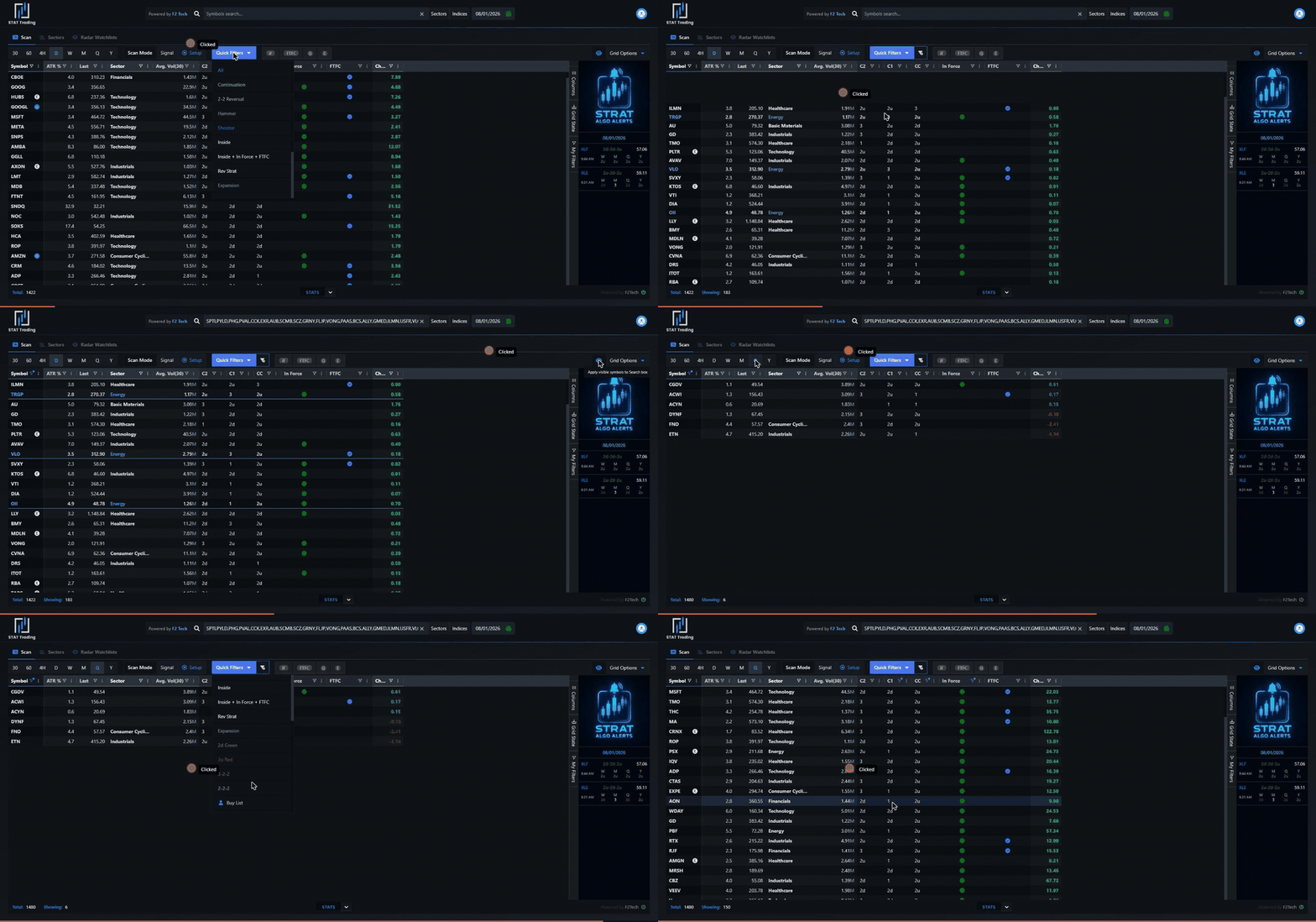
At the top right of the grid, just left of Grid Options, is an eye icon. Its tooltip reads “Apply visible symbols to Search box”, and that is exactly what it does: every symbol in the current result set is written into the Symbols search box at the top as a comma-separated list.
The grid is now pinned to those names. Change the timeframe, change the quick filter, change the CC filter: the universe stays fixed to the list you captured. You are no longer scanning the market; you are scanning your own result set.

To start over, click the × at the right edge of the search box. The full universe comes back.
The workflow, in four moves
1. Run the first scan. Set the timeframe and filters for the condition you care about most.
2. Click the eye. The visible names are pinned into the search box.
3. Change the question. Switch to another timeframe, or apply a different quick filter.
4. Read what survived. Whatever is still on screen satisfies both conditions.
The order matters. Put the rarer condition first, because it produces the smaller list and everything downstream is cheaper to read.
Worked example: a daily 2d hammer that is on the quarterly buy list
The setup being hunted is a 2d-2u reversal: a bar that took out the prior low, got rejected, and left a long lower wick. The reversal trigger is that hammer‘s high. It is a far better trade when the higher timeframe is already pointing up, so the second condition is the quarterly buy list.
Move 1: the daily setup. Timeframe D. Scan Mode Setup. Quick Filters → Hammer. Filter the CC column to 2d. You now have every name whose current daily candle took out yesterday’s low and is printing a hammer: a 2d hammer, the raw material of a 2d-2u reversal.
Move 2: pin them. Click the eye. The names land in the search box.
Move 3: change the timeframe. Click Q. The same names are now described by their quarterly bars, and the sector stats at the bottom re-read for the quarter. Nothing else changed: the universe is still your daily hammers.
Move 4: apply the buy list. Quick Filters → Buy List. What remains is the answer: names printing a 2d hammer today that are also on the quarterly buy list, a daily reversal setup pointing the same way as the quarter.

Read the Showing count as you go. Each move should cut the list; if a step does not cut it, that condition was not restrictive and the scan is not telling you much.
Why this beats one big filter
Because the conditions live on different timeframes. A single grid describes one timeframe at a time: CC on the daily cannot also mean CC on the quarterly. Pinning the symbols is what lets you carry a daily answer into a quarterly question. It is timeframe continuity expressed as a filter: the trade you take on the daily should not be fighting the quarter.
The same shape works for anything: a 60-minute inside bar inside a name that is FTFC up on the daily; a weekly shooter inside a sector that is heavily 2d on the month; a gapper that is also on the monthly sell list. Each one is a first scan, the eye, then a second scan.
Save the ones you repeat
When a compound scan earns its place in your routine, save the layout: Grid State → Save current state on the right rail, and keep the filter combination under My Filters. The pinned symbol list is deliberately temporary (it is a result, not a setting), so the part worth saving is the grid that produces it.
Related: The Scan Grid · Scan Recipes · The Buy/Sell List · Hammer · Full Timeframe Continuity
Back to: Scan Recipes →
TheStrat was developed by Rob Smith. These docs are written by Alex Sopa (AlexsOptions) and quote his teaching. Work in progress: spotted an error? Tell Alex.
For AI agents: free TheStrat tools (MCP and REST) at thestrat.ai/agents.
